


Photo proofing has come a long way.
What used to involve printed contact sheets, handwritten notes, and in-person meetings has now evolved into fully digital, collaborative workflows that happen in real time.
But while tools have changed, one goal remains the same:
Helping clients choose the right photos quickly and confidently.
From Contact Sheets to Digital Files
In the early days of photography, proofing was a physical process.
Photographers would print contact sheets — pages filled with small thumbnail images — and clients would review them manually, marking selections with pens or stickers.
This process was slow, but it was clear.
Everyone could see the same images, and selections were visually obvious.
As photography moved into the digital world, contact sheets were replaced by folders, files, and PDFs.
While this made sharing easier, it also introduced new problems.
The Problem with Early Digital Proofing

When digital workflows first became common, many photographers relied on:
Email attachments
Cloud storage links
PDF contact sheets
Excel or Google Sheets for selections
While these tools improved accessibility, they did not improve clarity.
Clients still had to:
Remember file names
Type out image numbers
Send feedback separately from the images
Navigate multiple tools
This created friction in the proofing process.
What Clients Expect Today
Today’s clients expect something very different.
They want a smooth, intuitive experience that feels as simple as scrolling through social media.
Clients want to:
View photos instantly
Select their favorites easily
Leave feedback without confusion
Approve images quickly
Access everything from their phone or laptop
In short, they expect convenience and clarity.
What Modern Photo Proofing Looks Like
Modern photo proofing workflows are built around simplicity and collaboration.
Instead of using multiple tools, everything happens in one shared online space.
A typical workflow looks like this:
Upload and share a private gallery
Client reviews images in a clean interface
Client likes or selects preferred photos
Feedback is added directly on images
Photographer reviews comments and updates edits
Final selections are approved and delivered
This process reduces friction and speeds up the entire project.
Favorites and Selections Made Simple
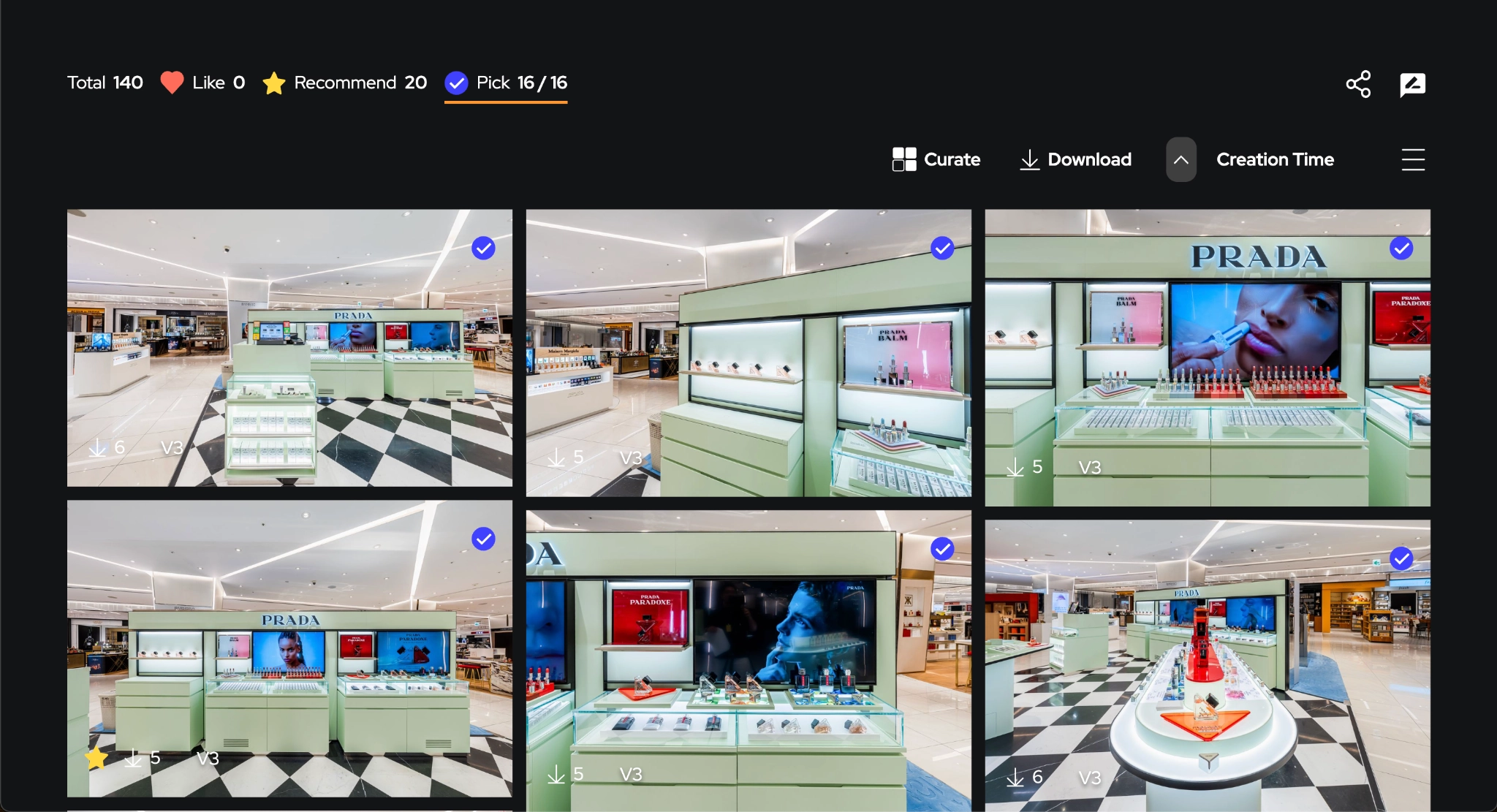
One of the biggest improvements in modern proofing is how selections are made.
Instead of listing file names, clients can simply click a heart or “favorite” button on the images they like.
This creates an instant visual selection list.
Photographers can immediately see:
Which images are preferred
How many selections are made
What should be edited or delivered
This removes guesswork and improves accuracy.
Comments and Feedback in Context
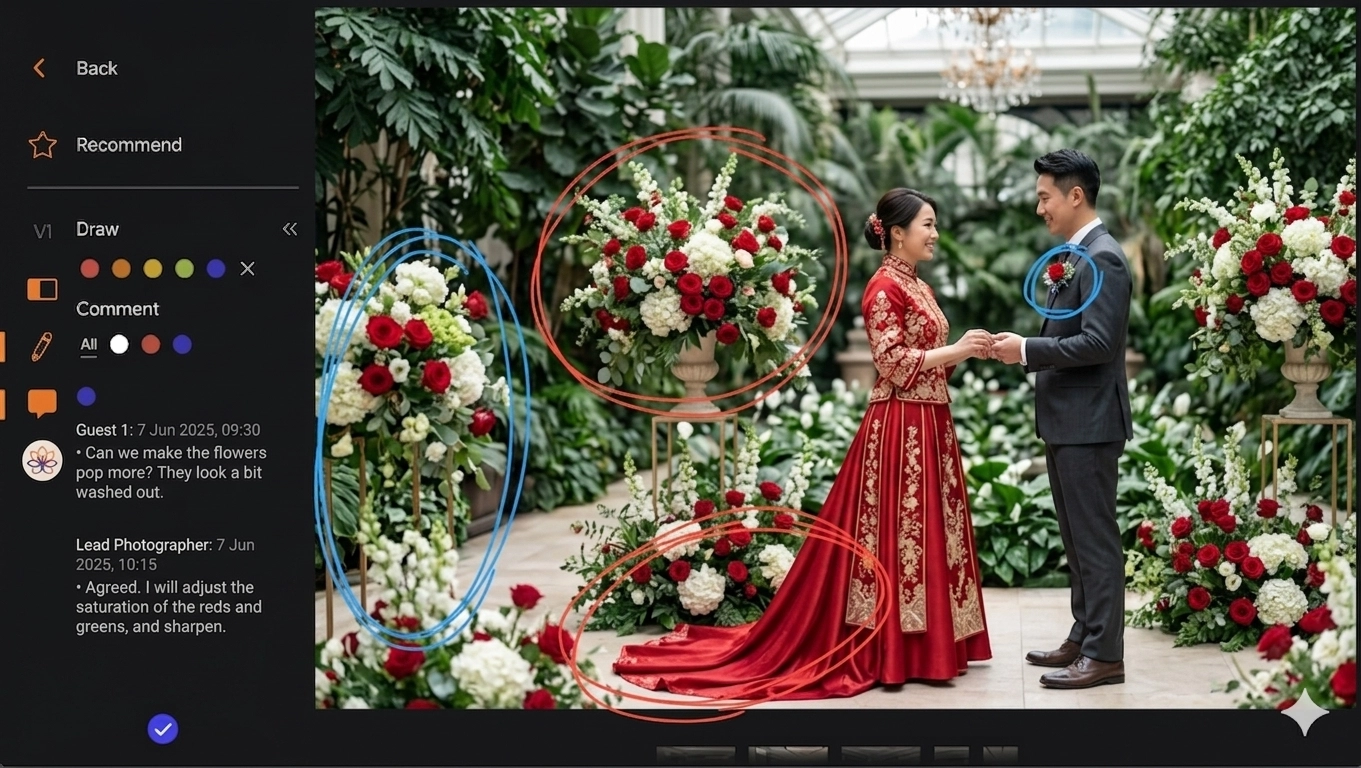
Modern proofing tools allow clients to leave comments directly on images.
This means feedback is no longer separated from the visuals.
For example:
“Please brighten this image”
“Crop this section slightly”
“Use this for the website banner”
Some platforms also allow threaded comments, making it easier to track conversations.
This keeps everything organized and easy to follow.
Visual Markup for Precise Edits
In addition to comments, some tools offer markup features.
Clients can draw or highlight areas directly on the image to indicate changes.
This is especially useful for:
Retouching requests
Product photography
Commercial shoots
Branding and campaign visuals
Instead of explaining edits in words, clients can show exactly what they mean.
This reduces misunderstandings and revision rounds.
Faster Approvals, Better Experience

With clear selections and feedback, approvals become much faster.
Clients can review everything in one place and confirm final images without long email chains.
For photographers, this means:
Faster turnaround times
Fewer revisions
Less administrative work
For clients, it means:
A smoother experience
Better visibility into the process
More confidence in the final results
Why This Matters for Modern Photographers
Today, photography is not just about delivering high-quality images.
It is also about delivering a great client experience.
Photographers who use modern proofing workflows stand out because they:
Communicate more clearly
Deliver faster
Reduce friction in projects
Build stronger relationships with clients
In many cases, the workflow itself becomes part of the value you offer.
How Gump Fits Into Modern Proofing Workflows

Platforms like Gump bring these modern proofing workflows into one seamless system.
Instead of combining multiple tools, Gump allows photographers and teams to:
Share private galleries instantly
Let clients select and favorite images
Collect comments and feedback in one place
Use markup tools for clear instructions
Manage approvals efficiently
Collaborate across teams and locations
Use AI-powered search to find images faster
This makes the entire proofing process smoother, faster, and more scalable.
From Workflow to Experience
The evolution from contact sheets to cloud-based proofing is more than just a technical upgrade.
It is a shift in how photographers and clients work together.
The best workflows today are not only efficient — they are intuitive, collaborative, and designed around the client experience.
Because in the end, great photography is not just about capturing moments.
It is about delivering them in a way that clients love.